Skiing Logbook KDP Interior Template
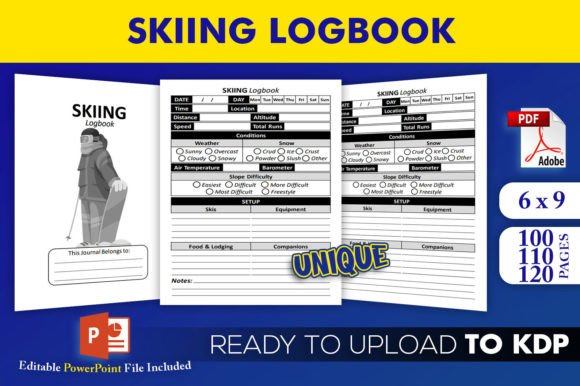
Designing a journal that feels instantly personal without endless layout work is a quiet superpower. The Skiing Logbook KDP Interior Template removes the heavy lifting. You receive an editable PowerPoint source file, plus three ready-to-upload PDFs for 100, 110, and 120 pages. Each interior has been tested on KDP, fits a 6×9 trim without bleed, and looks crisp thanks to high-resolution formatting. It isn’t just a file download. It’s a launchpad for a product that snow lovers will actually use.
What Makes This Template Worth Your Attention
At first glance, a logbook might seem straightforward. But the difference between a forgettable notebook and a keepsake lies in structure. This template balances guided logging with enough openness for personal reflection. The no-bleed setup means you won’t wrestle with margins. The three page-count variations let you test different price points or cater to light-versus-avid skiers. Because the files have been tested on KDP, you skip the guesswork around trim errors or rejected uploads. The editable PowerPoint gives you complete creative control—swap colors, add a brand logo, tweak header fonts, or localize prompts into another language.
Creative Directions for Your Ski Journal
Think beyond a generic date-and-notes layout. The source file invites reinterpretation. You might design a minimalist alpine aesthetic—plenty of white space, a single-line header, and a subtle snowflake motif. Another approach uses a vintage lodge feel with warm earth tones, woodcut-inspired icons, and slightly distressed typography. Let the template evolve into something unexpected:
- Family heirloom edition: Add a “Legacy Tip” prompt on each page where parents share one piece of wisdom from their own skiing days.
- Technical training journal: Insert checkboxes for slope gradient, snow type, equipment wax temperature, and vertical feet tracked.
- Resort bucket list tracker: Create a devoted section where owners color in miniature mountain icons after each visit.
- Mindful mountain log: Pair each skiing entry with a prompt like “One sound I noticed on the lift” or “How the cold air felt on my face.”
Adapting the Interior for Different Audiences
The moment you customize this Skiing Logbook KDP Interior Template, it stops being generic and starts speaking directly to a specific person. For parents gifting to young skiers, consider adding playful progress trackers—little illustrated badges for linking turns, conquering a black diamond, or skiing under the lights. A version aimed at older skiers might include larger, easier-to-read prompt boxes and a section for noting health metrics or joint-care routines after a long day on the slopes.
Coaches and ski instructors will find a raw template ready for transformation into a structured training diary. They can add fields like “Drill Focus,” “Video Analysis Notes,” and “Next-Session Goals.” The 120-page interior works best here because the season runs deep. Meanwhile, resort gift shops might license a branded version from you—just swap the cover and intro pages to include local trail maps, lodge restaurant recommendations, or seasonal event stamps.
Practical Ways to Build a Content-Rich Interior
A logbook’s real value comes from how easily it captures memories. Don’t settle for blank lines. Use the editable PowerPoint to layer in micro-sections that pull the reader back, year after year. Consider these field groupings:
- Quick capture zone: Date, resort, temperature, weather icon, companions, and a 1–10 stoke rating.
- Run recap: Space to jot three standout runs, lift names, and trail conditions. A small circle to color in for powder, packed powder, slush, or ice gives visual satisfaction.
- Gear notes: Skis used, boot fit comments, lens tint, and binding DIN setting. This turns the journal into a useful reference when adjusting equipment later.
- Anecdote pocket: A lined box with the prompt “Something I’ll want to remember.” No word minimum. Just enough room for that funny chairlift conversation or the sunrise over the ridge.
- Après-ski sidebar: A tiny section for lodge meals, favorite hot drink, or music that matched the mood.
Each page doesn’t need every field. Rotate prompts across pages so the journal feels fresh every time it opens. The three PDF lengths let you distribute these rotations generously—100 pages for a half-season log, 110 for a full resort season, and 120 for diehards who ski from November into late spring.
Keeping Your Design Clean and KDP-Ready
Because the template is already no-bleed and trim-sized at 6×9, you avoid the intimidation of interior formatting. Still, a few thoughtful touches make the final upload seamless. Keep all essential text at least 0.5 inches from the edge; even though there’s no bleed, bound books lose a sliver in the gutter. Use PowerPoint’s slide master to set consistent margins and header placement. Test your PDFs using Kindle Create or the KDP Previewer to confirm page numbers sit exactly where you expect.
Color isn’t always necessary. A grayscale interior keeps printing costs lower, which can mean a better royalty rate for you. If you do introduce color, limit it to subtle line art or small icons that won’t eat into production expenses. The high-resolution source file ensures that even small decorative elements, like ski trail rating symbols or mountain peak silhouettes, stay crisp when printed.
Getting Found on Amazon Without Selling Out Your Authenticity
The title and subtitle you pair with this interior shape discoverability. Rather than stuffing keywords, build a title that combines clarity and emotion. A few examples: Alpine Days: A Skier’s Season Logbook, Mountain Memory Keeper: A Personalized Ski Journal, or Slope Notes: Your Complete Ski Trip Tracker. In your description, describe the experience of using the journal—imagine someone sitting in a lodge, steaming mug beside them, filling in the day’s details while snow falls outside. That scene sells harder than a list of features.
Use the PowerPoint file to brand the copyright page with your publishing imprint, even if it’s just a pen name. A small note encouraging buyers to tag you on social media turns customers into community. Mention that the interior has been “tested on KDP” in your product description because it signals quality control to skeptical shoppers.
Turning One Template into Multiple Revenue Streams
Once the base design clicks, spinning off related editions takes minimal effort. Change the cover, tweak the interior prompts, and you have a snowboard logbook, a backcountry touring journal, a family ski vacation planner, or even a winter trail running diary. The editable source file is the key—you’re not starting from scratch. A freelance designer can use it to build custom client work: a ski club might commission a 50-page powder day tracker, or a corporate ski retreat might want a branded reflection journal. Because you own the editable PPTX, licensing to small businesses becomes a real option.
Not every product needs mass appeal. A hyper-specific version, like a monoski logbook or a telemark technique journal, might only sell 20 copies a month, but it competes in a much quieter keyword space. The 100-page PDF often fits these niche variants perfectly, keeping the perceived value high without overwhelming beginners.
Design Details That Elevate the Everyday Entry
Small choices in the PowerPoint file ripple outward. Replace standard bullet points with tiny skier icons. Use a consistent header font that reminds people of vintage trail signs—something sturdy and slightly rounded. Add a dotted grid instead of solid lines for notes; it gives a more open, sketch-friendly feel. If you’re designing a version for kids, scatter simple line-art mountains to color in after each trip.
Since the template includes three page-count options, think about how the thickness of a book changes the user’s emotional experience. A thin 100-page journal feels approachable for a first-time ski season. A thicker 120-page journal signals dedication and becomes a weighty keepsake. Your product photos can emphasize that heft. Show the book open flat, filled with handwriting samples that look real, not placeholder Lorem Ipsum. Realism attracts buyers who are tired of generic interiors.
Keeping the Process Enjoyable for You as the Creator
Templates work best when they disappear behind the content. That means you spend less time lining up margins and more time imagining the skier’s journey. Before you finalize any version, fill out three pages by hand. Notice any friction. Is the date field too cramped? Does the “equipment” section feel like a chore? Adjust until the act of logging feels effortless. Your enthusiasm will show in the completed product, and customers sense that care.
Remember that the high-resolution, no-bleed interior you download has been tested on KDP—that’s your safety net. Trust it. Then play. Because a Skiing Logbook KDP Interior Template isn’t just a file. It’s a framework for creating something that lives in someone’s backpack, their ski cabin, their drawer of winter memories. And that’s a pretty good way to spend a few hours designing.