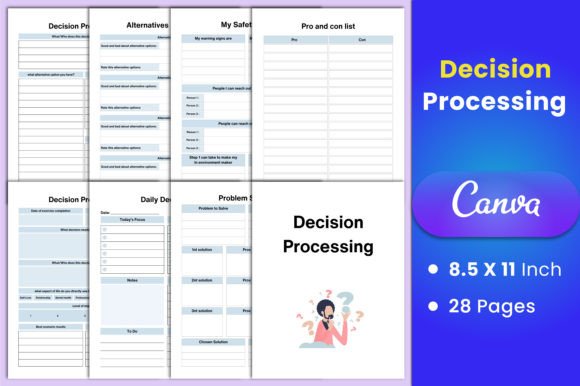
Transform Your Choices with a Decision Processing Planner
In a fast-paced world filled with endless options, clarity often feels just out of reach. A Decision Processing Planner changes that. It’s not a simple diary—it’s a structured toolkit that walks you through every stage of making a choice, from the first flicker of uncertainty to a confident action step. By blending emotional awareness with practical analysis, it helps you stop second-guessing and start moving forward with purpose. Creatives, entrepreneurs, educators, and anyone craving intentional living will find it an anchor amid the noise. The planner doesn’t just organize thoughts; it reshapes how you relate to your own decision-making power.
What Makes This Planner Stand Out
Unlike a blank notebook, this system is purpose-built for the anatomy of a choice. It recognizes that good decisions are rarely purely logical—they are also deeply personal. That’s why it pairs tools like a Feelings Inventory with a Pro and Con List. The result is a whole-brain approach where intuition and reason coexist. Each of the 28 templates inside the Decision Processing Planner Canva Interior acts as a gentle guide, not a rigid form. You can pour your messy thoughts onto the page and trust the framework to help you sort them into clarity. This isn’t about forcing a “right” answer; it’s about building self-trust with every completed worksheet.
Core Pages That Ground Your Decision Journey
The heart of the planner lies in its carefully curated collection of sheets. They are designed to be used fluidly—pick one page for a quick daily check-in or combine several for a major life crossroads. Here’s how key sections support your process.
Feelings Inventory and Problem Solving
Decisions rarely start from a neutral place. The Feelings Inventory page encourages you to name and validate what’s stirring inside—fear, excitement, resistance—before you jump into solution mode. Once you’re emotionally grounded, the two unique Problem Solving pages help you articulate the real challenge without bypassing nuance. This step alone can prevent reactive choices and reveal root causes that need attention, turning a vague worry into a concrete puzzle you can actually work on.
Alternatives Analyzing and the Decision Wheel
Creative thinking thrives when you expand your options. The Alternatives Analyzing page pushes you past the obvious by inviting you to list even unconventional possibilities. Paired with the Decision Wheel, you gain a visual way to weigh variables. Spin the wheel mentally as you assign weights to criteria like impact, effort, or alignment with values. This dual method works beautifully for visual thinkers and anyone stuck in binary thinking. You begin to see that every path has a unique shape, not just a label of good or bad.
Pro and Con List Redefined
The classic list gets a meaningful upgrade. Instead of just tallying points, this planner helps you assign depth to each item. Is a “con” really a dealbreaker, or is it a fear dressed up as logic? By revisiting the Pro and Con List alongside the Decision List page, you can sequence your top contenders and notice patterns over time. This turns a simple list into a reflective practice.
From Daily Crossroads to Long-Term Vision
Not every choice is monumental. Some are small stones that pave a larger path. The planner gracefully handles both scales through dedicated tracking and reflection pages. The Daily Decision and Weekly Decision sheets help you spot micro-patterns—like repeatedly saying yes when you mean no, or avoiding a certain type of task. Meanwhile, the Monthly Decision Reflection invites you to look back and ask, “What worked? Where did I honour my values?” This rhythm of checking in turns decision-making from a stressful event into a skill you refine over weeks and months.
Manifestation Meets Practicality
Intentions without a plan can evaporate. The Manifestation Worksheet bridges that gap by tying your desires to tangible steps. You’re not just dreaming; you’re breaking down a vision into the specific choices that bring it closer. Combined with the Level 10 Life Goals page, you can evaluate ten key areas—health, career, relationships—and then funnel insights back into your decision process. This makes the planner a compass for both everyday and lifetime directions.
Emotional Safety and Mental Clarity
Some of the most important decisions happen when we are emotionally raw or mentally overloaded. This planner includes compassionate supports for those moments. The My Safety Plan page gives you a customizable space to outline coping strategies, trusted contacts, and warning signs—all helpful in high-stress situations. The Thinking Patterns page encourages you to catch cognitive distortions that might skew your choices. Learning to recognize an “all-or-nothing” thought pattern, for instance, can open up a middle path you hadn’t noticed before.
Wellness Habits That Support Clear Thinking
No decision exists in a vacuum. Sleep, hydration, and mental stillness all affect your cognitive sharpness. The planner’s Sleep Tracker, Water Tracker, and Meditation Log ground your decision-making in biological and spiritual self-care. When you see that poor sleep correlates with more indecision, you can adjust your routines rather than blame your character. These pages quietly remind you that a nurtured mind makes wiser choices.
Creative Adaptations for Different Users
One size never fits all, which is why this Decision Processing Planner Canva Interior shines as a customizable resource. Its editable templates mean you can tweak colors, fonts, or wording to match your personality or brand. A small business owner might rebrand the planner as a client-facing tool, guiding customers through package selections. A life coach could add their logo and use it as a signature workbook. Educators might print only the Decision Impact Tracker and Take Action pages for a classroom project on critical thinking. Because you receive the high-quality Canva link, you’re not stuck with a static layout—you can freely rearrange and personalize every element.
For Bloggers, Marketers, and Content Creators
If you create content around productivity, self-improvement, or mental health, this planner becomes a wellspring of material. Use individual pages as freebies to grow your email list, or adapt the Decision Wheel into an engaging social media graphic. The Important Contact List and Resources pages can be reimagined into a community resource hub. The fact that you get not just PDF files but also JPG and PNG formats at 300 DPI means you have print-ready and web-ready options instantly. Your audience sees a polished, thoughtful resource, and you save hours of design time.
Keeping Your Experience Organized and Original
Even with the best templates, consistency matters. To get the most from your planner, treat it as a active conversation rather than a one-time dump. Start your morning with a Daily Decision page to set a clear intention, and end the week with the Decision Tracker to spot trends. If you’re working through a particularly tangled problem, flow through the pages in a loose sequence: Feelings Inventory → Alternatives Analyzing → Pro and Con List → Decision List. Do this in one sitting or spread it across days, letting your subconscious marinate. Over time, you’ll develop your own ritual that fits your rhythm. And because the files are editable in a free Canva account, you can duplicate pages, add text boxes, or even create hybrid pages that combine elements from different templates. The goal is a system that feels uniquely yours.
Practical Tips for Powerful Results
A tool is only as effective as the hand that uses it. Here are a few grounded suggestions to elevate your experience with the Decision Processing Planner:
- Start small. Don’t try to fill every page at once. Pick one sheet that resonates with a current minor decision and get comfortable with the flow.
- Embrace imperfection. Write messily, cross things out, and let the pages hold your process. This isn’t about a pretty final product; it’s about working through noise.
- Combine digital and physical. Use the Canva link to customize and print a few pages as a mini-journal for your bag, while keeping the full PDF on your tablet for deeper sessions. The high-resolution JPG files can even be loaded into a notes app for quick annotation.
- Review with curiosity, not judgment. When you look back at past decisions, notice patterns without labeling yourself “right” or “wrong.” The Decision Impact Tracker is there to teach, not to shame.
- Share the tool. If you’re a facilitator, print select pages for a workshop. The 8.5x11 inch size with no bleed makes home printing hassle-free.
What You’ll Actually Receive
This is a comprehensive, ready-to-use package that respects your time and your creative freedom. Inside, you get 28 unique template pages that cover every phase of decision-making—from emotional awareness to actionable follow-up. The files include an editable Canva link so you can start personalizing within minutes using a free account. You also receive high-quality PDF, JPG, and PNG files at 300 DPI, perfectly sized at 8.5x11 inches with no bleed. Whether you want to print at home, send to a professional printer, or share digitally, the quality is crisp and consistent. The planner’s design is clean and intentional, allowing you to focus on the inner work without visual clutter—yet it’s flexible enough to become whatever you need it to be.
A Decision Processing Planner is more than a purchase; it’s an investment in your ability to navigate life with less stress and more self-respect. When your choices align with your deepest values, even the smallest daily decisions start to feel meaningful. With this Canva interior as your foundation, you hold a creative, adaptable system that grows alongside you. Use it to untangle a single stubborn dilemma or to redesign your entire approach to living intentionally. The pages are patient, nonjudgmental, and ready when you are.