Incomes and Expenses Log Book for KDP
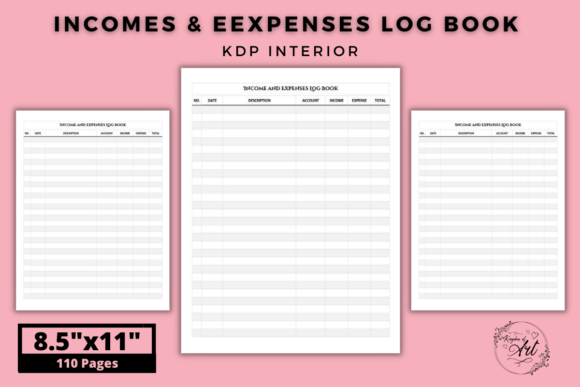
Keeping a clear record of money coming in and going out is one of the smartest habits any self-publisher can build. The Incomes and Expenses Log Book for KDP is a ready‑to‑upload interior file created specifically for Kindle Direct Publishing. Instead of wrestling with confusing spreadsheets or generic notebooks, you get 110 structured pages with a consistent 7‑column table format. Each page gives you space to log transaction dates, descriptions, income sources, expense categories, amounts, running totals, and any extra notes you need. It’s printed on blank ink and white paper, designed with no‑bleed, and comes as a high‑resolution PDF — alongside an editable file so you can tweak the cover, fonts, or branding before you publish.
Because the interior is already formatted to KDP’s size requirements (8.5 × 11 inches) and bleed specifications, you skip the technical headaches that often trip up first‑time creators. People who buy a log book like this range from freelance writers and content creators to small business owners and authors building a backlist. The appeal is simple: turn financial tracking into a physical, distraction‑free ritual while producing a professional paperback that looks great on Amazon.
Overlooking the Difference Between a Generic Notebook and a Purpose‑Built Ledger
A common mistake is assuming any blank notebook works just as well. You might grab a lined journal and manually draw columns, or use a planner that lacks dedicated income and expense sections. While that can work in a pinch, it quickly becomes frustrating. Without predefined columns for categories, you end up mixing notes in margins, forgetting to record key details, or skipping logs altogether when you’re in a hurry.
A purpose‑built log book like the Incomes and Expenses Log Book for KDP eliminates that friction. The 7‑column layout already thinks through what a self‑publisher needs: you can separate royalty payments from affiliate income, distinguish ad spend from editing costs, and clearly see whether a month ran in the black or red. When every page follows the same structure, reviewing quarterly numbers or handing records to an accountant becomes far easier. The structure gently corrects the habit of recording only vague entries, which often leads to surprise cash flow problems later.
Ignoring the Importance of Column Count and Logical Flow
Some budget trackers offer only date, description, and amount fields. That minimal setup works for simple personal budgeting, but it leaves big gaps for a KDP author. You might have multiple income streams — ebook royalties, paperback sales, Kindle Unlimited page reads, and maybe even merchandise or speaking fees. Without an income source column, you’ll struggle to separate these later, making it tough to know which books or promotions actually pay off.
The 7‑column design in this log book typically allows you to capture date, description, income, expense, category, payment method, and balance (or similar custom fields). You can adjust the editable file to rename columns to match your exact workflow, like “Royalty Source” or “Ad Platform.” Having that flexibility prevents the all‑too‑common error of burying important information in a combined field where it’s useless for analysis. Well‑chosen columns also reduce the temptation to skip entries. When you see a clear slot for each data point, you’re more likely to complete the record fully, which means your profit picture stays accurate.
Confusing “No‑Bleed” with “No‑Margin” — and Why It Matters
Many creators misunderstand print specifications. The term no‑bleed means the design doesn’t extend to the edge of the page, so you won’t lose content in the trim area. That’s actually a good thing for a log book because tables and headers sit safely inside the margins. However, I’ve seen buyers assume no‑bleed means the table can run right up to the paper’s edge, or they mistake it for “no margins.”
Printing a no‑bleed file incorrectly (for instance, by scaling it to fill the page in a PDF viewer) can cut off the outer columns during production. The Incomes and Expenses Log Book for KDP is built to avoid this, with comfortable internal padding and a standard 8.5 × 11 inch frame. When you upload directly to KDP, the system recognizes the trim size and preserves every column. Still, it’s wise to always preview the file after uploading, flip through the digital proof, and confirm that the table aligns evenly. If you decide to edit the PDF, keep column widths inside the safe zone so that nothing gets clipped when Amazon prints and binds the book.
Skipping the Editable File as a Branding Opportunity
Many low‑content interiors come as a flat, non‑editable PDF. You publish it as‑is, and your book looks identical to dozens of others. The Incomes and Expenses Log Book for KDP includes an editable source file, which is a significant advantage that people often waste. They either don’t know how to use it, or they assume changing anything will break the layout.
You can open that file in free software like Canva or a vector editor like Inkscape and adjust header fonts, add a subtle logo, or even rename the columns to target a specific audience — such as “Author Income & Expense Tracker” or “Small Biz Ledger.” This small customization can increase return on investment because your log book stands out in search results and builds a consistent brand across your catalog. One mistake is overwriting the original without keeping a backup. Always duplicate the editable file first, then make versions. That way, if a font renders oddly after upload, you can revert quickly without rebuilding the entire interior from scratch.
Thinking a Bookkeeper‑Style Log Is Only for Large Operations
A freelancer or part‑time author often reasons, “I only have a handful of transactions each month, I’ll just keep a note on my phone.” Over time, those digital notes scatter, and it becomes nearly impossible to reconstruct a full year of expenses for taxes. A physical log book doesn’t require booting up a computer or opening an app that might distract you with notifications. It’s immediate, and the act of writing reinforces awareness of where money is moving.
Even with low volume, consistent logging surfaces patterns you’d otherwise miss. You might spot subscription creep — small monthly tools that add up — or realize that a certain promotion consistently loses money. With 110 pages, this log book covers a full annual cycle if you use one page per week or a few pages per month. That’s a manageable commitment, not an overwhelming business accounting system. The mistake is postponing the habit until you “need” it. Start before tax time panic hits, and the log becomes a natural extension of your publishing workflow.
Using the Log Book for Data Entry Without a Review Routine
Recording transactions is only half the job. A common pitfall is filling pages beautifully but never glancing back at the numbers. After a few weeks, the log book turns into a storage unit, not a decision‑making tool. That undercuts the primary benefit of tracking income and expenses in the first place.
Build a short weekly or monthly review session. Sit down with your Incomes and Expenses Log Book for KDP and highlight totals at the bottom of each page. Compare this month’s ad spend to royalties earned, and write a quick note about what worked. If you notice a category consistently draining funds without return, you’ll adjust before another payment cycle passes. The 7‑column structure makes it easy to calculate running balances, but if you never total them, you’re leaving valuable insight on the table. A simple habit of circling totals and jotting a summary line transforms the log from a passive record into an active financial compass.
Overlooking Print Quality Checks Before Publishing
Even with a high‑resolution PDF, things can go wrong during the upload process. The file might contain hidden layers, transparent objects, or fonts that weren’t properly embedded. This can lead to blurry tables or missing characters in the final print. Because this log book interior is specifically designed for KDP, it typically avoids those problems, but you shouldn’t skip a verification step.
Before hitting publish, order a physical proof copy — even if you’re confident. Flip through it, check column alignment on multiple pages, and make sure the paper is opaque enough that ink from the reverse side doesn’t show through heavily. The “black ink and white paper” description means it’s meant for crisp contrast, but paper stock can vary slightly by print location. If you notice table lines breaking or text looking faint, you can adjust the editable file to increase line weight slightly. A small fix before launch saves you from negative reviews about poor print quality, which directly impacts sales and credibility.
Misjudging the Need for Security and Offline Backup
We live in a cloud‑first world, and it’s tempting to rely exclusively on accounting apps. Those services are convenient, but they’re vulnerable to outages, subscription lapses, or data loss if you forget to export backups. A physical log book provides a non‑digital record that doesn’t require a password. For authors who handle sensitive financial information, having an offline copy can be reassuring. However, the mistake here is thinking a physical book is invulnerable — coffee spills, misplaced pages, or fire damage can wipe it out.
A balanced approach: keep the log book handy for daily entries, but snap a photo of each completed page weekly with your phone. Save those images to a folder that syncs to the cloud. You’ll have a visual backup without duplicating manual data entry. Combined with the editable PDF original, you create a resilient system. The log book remains your primary tool for handwriting transactions, while the digital snapshots guard against physical loss. That layered strategy avoids the single‑point‑of‑failure problem that catches many organized people off guard.
Not Matching the Log Book to Your Specific Publishing Workflow
A workbook designed for an e‑commerce shop might not fit a KDP author’s income types. Before you purchase or use any log book interior, look closely at the column arrangement. The Incomes and Expenses Log Book for KDP offers 7 columns, which gives you room for categories like “KDP Royalty,” “IngramSpark,” “Freelance Gigs,” or “Co‑Author Split.” If you don’t customize the printable to match your reality, you’ll find yourself constantly writing in the margins, which reintroduces clutter.
Take an hour to map your typical monthly transactions. What labels do you actually need? If you run Facebook ads for each new book launch, you might want an “Ad Platform” column. If you work with a virtual assistant, a “Contractor Pay” category keeps those costs separate from tools. Then open the editable file and tailor the column headers accordingly. A tiny up‑front investment of time prevents the frustrating situation where your log book never quite fits, causing you to abandon it. The easier it is to record an entry in exactly the right spot, the more likely you’ll stick with the habit long‑term.
Assuming a Log Book Alone Replaces Good Financial Habits
No tool, no matter how well‑designed, fixes procrastination or disorganization by itself. A beautifully structured interior tempts you to believe that simply owning it will make tracking effortless. The reality is that you still need to sit down regularly and fill in the rows. I’ve seen people print the PDF, bind it beautifully, then let it sit on a shelf because they waited for a “perfect” time to start — usually January 1st, which comes and goes.
Start mid‑month if you have to. The first few entries will feel awkward, and that’s fine. Keep the log book on your desk, open to the current page, with a pen right beside it. Pair the logging habit with something you already do, like checking your KDP sales dashboard. After nine or ten consistent days, the friction drops. If you miss a day, pick up where you left off without guilt. The goal is realistic consistency, not perfection. A 110‑page volume gives you enough space to build a genuine habit while forgiving the occasional skipped entry.
What to Check Before Making Your Purchase or Upload Decision
- Verify the trim size: Confirm the interior is truly 8.5 × 11 inches and that your KDP paperback settings match. A mismatch causes rejected uploads or stretched content.
- Inspect the editable file compatibility: Some editable files require specific software. Check if it works with Canva, Photoshop, or Inkscape, and test it before investing heavy design time.
- Confirm no‑bleed guidelines: A no‑bleed design is safe for content, but always preview the uploaded file in KDP’s Print Previewer to verify margins look even on all sides.
- Page count and ink density: Black ink on white paper usually prints well, but very thin lines may disappear on certain printers. Order a proof copy to check clarity, especially if you plan to scale the file.
- Logical column flow for your use case: Open the PDF on screen and imagine a busy month. Can you fill each column naturally without cramping? If not, plan to rename or merge columns using the editable version.
- Backup strategy: Save the original high‑resolution PDF and the editable file in at least two places. Label them clearly with the version and date so future edits don’t overwrite the clean master.
Choosing a dedicated Incomes and Expenses Log Book for KDP interior eliminates many of the technical and design barriers that make self‑publishers shy away from tracking their finances properly. When you avoid the common missteps — like ignoring column structure, skipping proof checks, or treating the log as a static book rather than an active tool — you’ll find that managing author income becomes clearer and less stressful. The 110‑page layout, editable source file, and print‑ready parameters give you a solid foundation. Pair that with a simple weekly review habit, and you’ll move from guesswork to genuine control over your publishing profit.