How an Editable Fitness Planner Bundle Becomes the Organizing Layer of Your Wellness Workflow
Most fitness journeys stall not because of motivation, but because of missing connective tissue between intention and daily action. You know you want to exercise more, eat better, and track progress, yet those goals often float in mental space without a system that translates them into concrete, repeatable steps. The Editable Fitness Planner Bundle isn’t just a collection of printable pages—it’s a modular planning environment built entirely inside Canva, designed to be reshaped, resized, and layered into your existing rhythms. When used thoughtfully, it becomes the single source of truth for your wellness commitments, bridging the gap between big-picture aspirations and the 10-minute check-in you do over morning coffee.
Where the Planner Fits in a Broader Personal Operating System
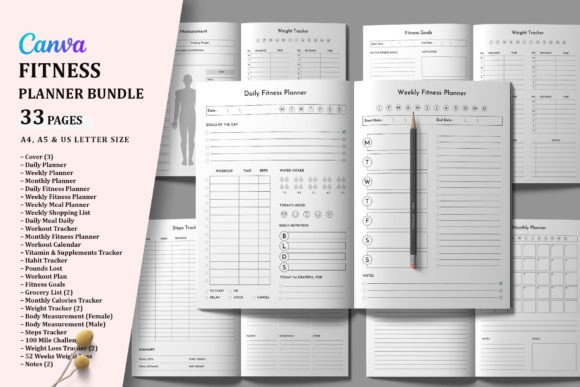
No productivity tool works in isolation. The Editable Fitness Planner Bundle occupies a specific role: it’s the dedicated health-and-movement layer that sits alongside your project management boards, digital calendars, or paper bullet journals. Instead of jamming workout notes into a generic daily spread, you give fitness its own structured home. This separation matters because it reduces cognitive load. When you open the bundle, your brain shifts into a specific context—similar to how a dedicated workspace cues focus. The bundle’s 33 pages aren’t meant to be used all at once. You’ll typically extract the pieces that align with your current priorities and integrate them into a weekly rhythm.
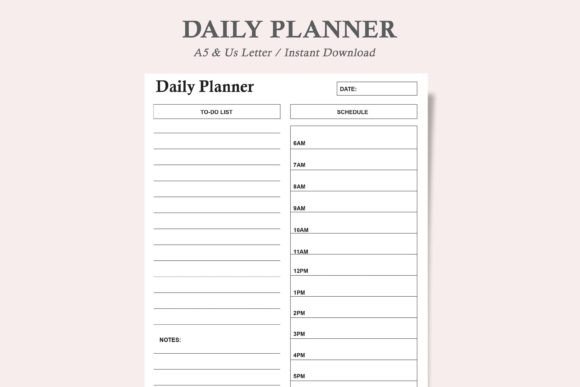
Think of the bundle as a toolkit you customize before, during, and after each fitness phase. Before a new month, you might pull up the Fitness Goals and Workout Plan templates to define what success looks like. During the week, the Daily Fitness Planner and Weekly Meal Planner keep you aligned. After a cycle, the Weight Tracker and Pounds Lost pages give you honest data for course correction. This before-during-after interaction prevents the common planning trap of designing beautiful systems that never touch reality. Each page has a moment in your workflow, and because everything is editable in Canva, you’re never stuck with a format that doesn’t match your actual behavior.
Customization as a Workflow Superpower, Not a Gimmick
The real leverage of the Editable Fitness Planner Bundle lies in how deeply you can make it your own. Pre-designed templates give you a starting point, but the ability to change fonts, colors, element sizes, and even the orientation of a page isn’t about aesthetics alone. It’s about removing friction from daily use. If a Daily Meal tracker includes fields you never fill out, you delete them. If the Habit Tracker’s default color scheme doesn’t match your kitchen wall or tablet screen where you’ll see it, you adjust it in seconds. That level of control means the planner conforms to you, not the other way around. When a tool asks for less mental translation, it gets used more consistently.
Canva’s drag-and-drop interface lowers the barrier for this ongoing refinement. You might start with the US Letter size for a binder, then realize you want a compact A5 version for your gym bag. Resizing is a few clicks, not a near-restart from scratch. This compatibility across print and digital formats—A4, A5, US Letter—makes the bundle equally useful for someone who prints weekly and scribbles with a pen, and someone who keeps everything on a tablet with a stylus. The files work with both free and Pro Canva accounts, so you don’t need a subscription to begin. That accessibility is critical for long-term adoption, especially when you’re onboarding a partner or household into a shared wellness system.
Practical Integration: Building a Weekly Planning Cadence
To understand how the bundle works in practice, walk through a typical Sunday setup. You open your copy of the planner in Canva, and you’ve already grouped your most-used templates into a single document. You start with the Weekly Planner to see appointments, work blocks, and family commitments. Beside it, you pull up the Weekly Fitness Planner and Workout Calendar. You’re not guessing where a run or strength session might fit—you’re slotting those activities into the gaps your schedule reveals. Immediately, you spot a conflict: Tuesday’s only available slot is 45 minutes, not the 60-minute class you wanted. So you adjust the Workout Plan template, dragging a premade bodyweight circuit into that day because it fits the time window. The template’s editable text boxes let you rewrite the plan right then.
From there, you move to food coordination. The Weekly Meal Planner and Weekly Shopping List work as a pair. You sketch meals in the planner, then the ingredients auto-populate mentally as you type up the shopping list—or you could group those templates on the same Canva page to make the transfer visual. The Grocery List variations in the bundle let you keep a running tally through the week if you share the document on a cloud-synced tablet. This isn’t meal planning in a vacuum; it’s meal planning driven by the workout intensity you’ve already scheduled. A double session day gets more carbohydrates and a recovery protein note. Because you can change font size and element layout, you make those nutritional cues prominent enough to see at a glance.
Using the Bundle for Reflection and Data-Driven Iteration
A planning system that only looks forward misses half its value. The Editable Fitness Planner Bundle includes several tracking templates that close the feedback loop: Weight Tracker, Monthly Calories Tracker, Vitamin Supplements Tracker, and Pounds Lost. These aren’t just logs; they become the retrospective layer of your wellness workflow. At the end of each week or month, you sit with these filled pages. Maybe the Monthly Calories Tracker shows a sharp deficit on weekends, which aligns with a pattern you see in the Habit Tracker where sleep quality dips on Friday and Saturday. Without this visual correlation, you’d simply feel “off” but not know why. Now you can test a small change: add a specific evening snack to the Daily Meal template on Friday, or shift your Saturday workout time earlier. The planner doesn’t prescribe that solution; it makes the data visible so you can decide.
Over longer stretches, the Fitness Goals page becomes a living document you revisit quarterly. Because it’s editable in Canva, you don’t need to reprint or rewrite the whole thing. You can duplicate the page, archive the previous version, and update targets. Maybe your initial goal was “lose 15 pounds.” After two months, you realize body composition matters more than scale weight, so you change the template’s text to focus on strength benchmarks visible in your Workout Tracker. This evolution is natural, but it only happens when the tool supports quick edits without friction. If a static PDF forced you to white-out and reprint, you’d probably delay updating, and the goals would drift out of alignment.
Interacting with Other Tools, People, and Platforms
The bundle doesn’t demand you abandon your current apps or habits. Many users treat the printed pages as analog companions to a digital ecosystem. For example, you might log weight in the Weight Tracker and also sync that data to a health app for long-term trend analysis. The planner handles the daily touchpoint and visual motivation, while the app aggregates and graphs. The Vitamin Supplements Tracker might sit on a bathroom mirror next to the pill bottles; a partner or housemate can see it and know if you’ve already taken your morning stack, eliminating repeated questions. In a family setting, the Weekly Shopping List template becomes a shared Canva link that multiple people update before the grocery run. You’re not wrestling with scattered sticky notes—you’re using a living document that anyone can open and edit, with permissions that prevent accidental deletions if you set them up in a Canva team folder.
For fitness coaches or personal trainers, the commercial use allowance in the bundle opens a different workflow. You can customize a client-facing version, dropping in your logo, brand colors, and specific check-in prompts. The Workout Plan and Daily Fitness Planner become shareable assets you send before sessions. Because clients can resize to A5 or US Letter, they’ll print in whatever format fits their life. When a client’s needs shift from fat loss to maintenance, you quickly duplicate the planner document, adjust the Fitness Goals and Monthly Calories Tracker fields, and deliver an updated pack. This reduces onboarding time and keeps everyone looking at the same framework.
Quality Control and Long-Term Consistency
One underappreciated factor in any planning system is quality control—how you ensure the pages remain useful rather than becoming clutter. The Editable Fitness Planner Bundle supports this through its modular design. You can start with only five pages: a Weekly Planner, a Daily Fitness Planner, a Workout Tracker, a Weekly Meal Planner, and a Habit Tracker. If you find after two weeks that you never log supplements, you simply discard that template. If you discover a need for a Workout Calendar to schedule classes in advance, you add it. This build-as-you-go approach prevents overwhelm and respects the reality that commitment grows when the system earns its keep. Long-term, the bundle’s editability means you can do a monthly reset: duplicate the whole file, clear the data, and start fresh without losing the structure you refined over time.
Consistency also depends on the tool’s visual appeal and tactile presence. When you’ve invested an hour tweaking colors to match your home office, adjusting font hierarchy so the most critical numbers pop, and laying out the daily page exactly to your liking, you’re more likely to use it. That’s not vanity—it’s behavioral design. The bundle’s capacity to change orientation, add or delete elements, and resize text means the final product feels like your creation. That ownership creates a gentle accountability loop. You aren’t just filling someone else’s form; you’re interacting with a tool you built.
Navigating Common Implementation Challenges
The biggest mistake people make with editable templates is over-customizing before use. The bundle’s flexibility can tempt you to spend hours perfecting every page before you’ve tested a single one. Instead, adopt a minimum-viable-planner approach: select three core templates, make only essential tweaks, and use them for seven days. Your actual gripes—clunky fields, missing categories, color contrast that strains your eyes—will surface in practice, not in theory. Then you edit from real data. This sequence protects your time and keeps the project anchored in utility rather than decoration.
Another challenge is deciding between digital and print. The bundle supports both, but your workflow should dictate the choice. If you spend most of your day on a laptop, opening the planner in a Canva window alongside your calendar might feel seamless. If you find screen fatigue affects your mindfulness around food and movement, printing a few pages and placing them in a dedicated notebook creates a much-needed analog pause. Many people blend: digital for the grocery list you pull up on your phone in the store, print for the workout tracker that gets sweaty at the gym. Because the templates are resizable, you can format the print copy in A5 for portability while keeping the master file in US Letter for at-a-glance desktop reference.
Security and sharing also come into play. If you’re using the planner for sensitive health data, store your Canva files on your own drive rather than leaving them public. When sharing with a coach or partner, Canva’s view-versus-edit permissions let you control who can change the structure. A coach might have view-only access to your completed trackers, while you retain full edit rights. That simple distinction preserves the integrity of your templates while still enabling collaboration.
From Bundle to Habit: Making the Planner a Natural Part of Your Day
The Editable Fitness Planner Bundle ultimately succeeds when it disappears into your routine—when pulling up the Daily Fitness Planner becomes as automatic as checking email. To reach that state, anchor the planner to an existing habit. Stack it right after your morning toothbrush, or keep it on the kitchen counter next to the coffee maker. The Habit Tracker template reinforces this itself: by marking off tiny wins daily, you create a visual chain that you don’t want to break. The Weekly Shopping List gets pulled out every Saturday morning before you leave for the market. Over time, these pages stop feeling like “extra work” and start feeling like the dashboard that tells you whether your wellness machine is running smoothly.
And when life shifts—a new job, an injury, a change in dietary needs—you don’t abandon the system. You open Canva, duplicate the relevant pages, and adjust. A high-intensity workout calendar softens into a mobility-focused plan. The Monthly Calories Tracker becomes a maintenance log rather than a deficit log. The bundle’s editability protects the time you’ve invested in learning the tool while allowing it to evolve. That’s the difference between a planner that collects dust and one that becomes an enduring part of how you design your days.